Remote Vehicle Commands for Fleets: What They Are and How They Work
.png)
A vehicle goes missing from the yard. By the time anyone notices, it’s 40 miles away.
Location data can tell you where it went but it can’t stop the vehicle from going anywhere else. That takes a remote command: an instruction the fleet sends to the vehicle over the air. Disabling the ignition is one example. Once a vehicle is parked, it can’t be started again until an authorized user says so.
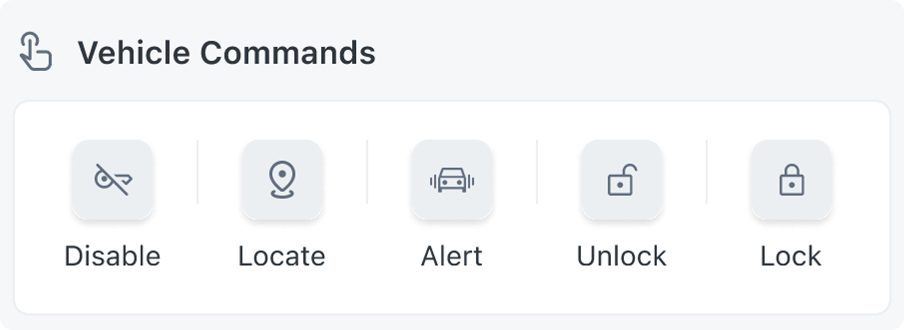
Immobilization is one of five remote vehicle commands that matter most to fleets. The other four include get location, door lock/unlock, alert (activate horn/lights), and EV charge start/stop. This post covers what remote vehicle commands are, how they work, where they come from, and the difference between OEM-native connectivity and aftermarket hardware approaches.
What are remote vehicle commands?
Vehicle connectivity can do two different things:
- Most of what fleets receive is data the vehicle reports on its own: location, odometer readings, and fault codes. The vehicle pushes out that data on a schedule or when an event happens.
- Commands run the other direction. Instead of listening to the vehicle, you are telling it to do something.
How do remote vehicle commands work?
A fleet manager, or an automated rule, sends the command from a platform. It travels over the cellular network to the vehicle, the vehicle acts on it, and a confirmation comes back so you know it worked.
Many newer vehicles have a connection built in by the automaker, so the command goes through the automaker’s system and the vehicle handles it itself. Vehicles without that connection need a device installed by a technician.
Commands usually take a few seconds, but can take longer if the vehicle is parked somewhere with weak signal.
Where do remote commands come from? OEM apps, portals, and platforms
A fleet can send a command in three ways:
- The OEM app or fleet portal — Automakers offer their own apps and web portals. For a fleet standardized on one make, an OEM portal may be all you need.
- A direct OEM API integration — Some automakers expose an API that includes remote commands, so a team can build commands into their own software. The cost for this approach is engineering time — each OEM integration is a separate build with their own quirks and upkeep.
- A connected vehicle platform — These software platforms have already integrated with OEM APIs or other aftermarket hardware. They present one consistent interface across automotive brands, so a command behaves the same way whether the vehicle is a Chevy or a Ford.
The five remote commands fleets rely on most
Get location: ask where a vehicle is right now
OEM location data typically arrives while a vehicle is running, and often once more when it’s switched off. After that, a parked vehicle goes quiet and your map keeps showing the last position it reported. Get location asks the vehicle where it is now.
The get location command is most useful when a vehicle isn’t where you expect it to be. It might have been towed, stolen, or moved without authorization. If it’s switched off and not reporting, the pin on your map may be out of date.
Ignition enable and disable: a remote engine immobilizer for theft and misuse
Disabling the ignition works as a remote engine immobilizer. The vehicle won’t start again until the asset owner turns it back on, which makes it the direct response to theft or unauthorized use. It’s built to take effect only once the vehicle is parked and the ignition is off, so it blocks the next start and doesn’t interfere with a vehicle that’s moving.
Door lock and unlock: access without a site visit
Remote lock and unlock saves fleets a lot of small trips. A vehicle left unlocked overnight with tools inside can be locked from a dashboard, and a pooled vehicle can be opened for the next authorized driver without anyone handing over a key. Lockouts get handled the same way, with no one driving out with a spare.
Alerts: direct someone to the right vehicle
A fob can honk a horn, but only for the person holding it, and only from nearby. In a fleet, the person who needs to find a vehicle is often someone else. A dispatcher can sound the horn and flash the lights on one specific vehicle, so a driver or technician can walk straight to it in a lot full of lookalikes. It also works on vehicles that don’t have a key at all, like shared units that run on digital keys.
EV charge start and stop: control cost, not just charging
As fleets electrify, charging turns into one of the biggest line items they can actually control. Starting and stopping charges remotely lets a fleet move sessions into cheaper off-peak hours. It also keeps dozens of vehicles from plugging in at the same moment and spiking the depot’s energy bill, and nobody has to walk the lot to manage it. Skipping unnecessary top-offs can also reduce battery wear over time.
OEM-native commands vs. aftermarket: why the difference matters
Two vehicles can offer the same command and deliver it in completely different ways.
The legacy approach is aftermarket hardware. For a command like ignition disable, an installer splices a physical relay into the vehicle’s starter circuit and wires it to an installed gateway that controls whether the starter gets power. It works, and for vehicles without built-in connectivity it may be the only option. But the downsides add up:
- Hardware has to be bought before it does anything. Every vehicle needs a gateway, and an immobilizer is usually a second device on top of it.
- Every vehicle needs a professional installation, which adds labor costs and downtime.
- The hardware is a physical point of failure, wired into a safety-relevant system, that has to be maintained over the life of the vehicle.
- When a vehicle is sold or returned, the aftermarket devices often need to be removed
OEM-native connectivity connectivity skips the extra device. Many vehicles already have a telematics system the automaker built in at the factory, so activating one takes little more than its VIN and the owner’s or driver’s consent. From there the vehicle can receive commands over the air, with no hardware to buy or install.
The tradeoff with OEM-native connectivity is coverage. OEM commands are mostly available on newer vehicles and support varies by automaker, make, model year, and region. Ask any provider for current coverage on your vehicles before committing.
How Motorq approaches remote vehicle commands
Motorq connects to vehicles through the telematics automakers have already built in, so there’s no hardware to install. Give us a VIN and consent, and the vehicle can start receiving the commands its automaker supports.
Every automaker handles data, consent, and confirmations a little differently. Motorq integrates with each one directly and normalizes them into a single interface, so a lock request looks the same across a mixed fleet and the confirmation comes back in the same form every time. Adding vehicles means adding VINs, not hardware.
Want to see which remote commands are available across your fleet’s vehicles? Book a demo with a Motorq expert today to learn more.


See what connected vehicles can do
OEM connectivity brings visibility without added hardware costs. Meet with a Motorq expert and see how connected vehicle intelligence can support your business.